
Concurrency is not parallelism — and the GIL is not the villain
Threads overlap waiting. Processes overlap computation. Understanding which your program does determines whether ThreadPoolExecutor or ProcessPoolExecutor is the right tool.
- Thread vs process model
- The GIL explained honestly
- ThreadPoolExecutor for I/O
- ProcessPoolExecutor for CPU
- asyncio and the event loop

The first mistake with concurrency is thinking it begins with syntax. It does not. It begins with a more annoying question: what is the program actually doing while time passes?
Abstract: Concurrency is the discipline of noticing the difference between waiting and working. Threads are often useful when a Python program waits on the outside world. Processes are often useful when Python code needs real CPU cores.
A program is not just code. It is code unfolding in time. Sometimes it is computing. Sometimes it is waiting for a socket, disk, database, API, file system, queue, model endpoint, or user. Sometimes it looks busy, but the CPU is doing almost nothing. Sometimes it looks simple, but one core is burning as hard as it can.
Concurrency is the discipline of noticing this difference.
Not all time is the same kind of time.
1. The First Distinction: Waiting vs Working
Imagine this small function:
import time


def fetch_profile(user_id: int) -> dict:
    time.sleep(1)
    return {"id": user_id, "name": f"user-{user_id}"}


for user_id in range(5):
    print(fetch_profile(user_id))
This takes about five seconds. But what was Python doing for those five seconds?
Almost nothing.
time.sleep(1) is a stand-in for waiting: an HTTP request, a database round trip, a file read,
a remote model call. The program is suspended in expectation. It has asked the world for something
and now sits there, politely, like a bureaucrat staring at a fax machine.
For this kind of problem, threads are often enough.
2. Threads: Many Lines of Waiting
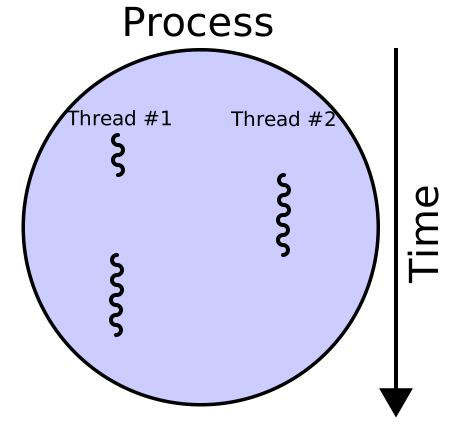
A thread lets one Python process keep multiple flows of execution alive. The important word is not “parallel.” The important word is “alive.”
If one thread is waiting for I/O, another thread can continue.
from concurrent.futures import ThreadPoolExecutor
import time


def fetch_profile(user_id: int) -> dict:
    time.sleep(1)
    return {"id": user_id, "name": f"user-{user_id}"}


with ThreadPoolExecutor(max_workers=5) as pool:
    results = pool.map(fetch_profile, range(5))

for profile in results:
    print(profile)
This still performs five one-second waits. But the waits overlap.
The shape changes from:
wait
wait
wait
wait
wait
to something closer to:
wait wait wait wait wait
That is the first real intuition. Threads are useful when your program spends much of its life waiting on the outside world. The program has not become more powerful. It has become less obedient to one queue of waiting.
3. The Trap: CPU Work Is Different
Now change the problem. Instead of waiting, do actual computation.
def count_primes(limit: int) -> int:
    count = 0

    for number in range(2, limit):
        for divisor in range(2, int(number ** 0.5) + 1):
            if number % divisor == 0:
                break
        else:
            count += 1

    return count
This function does not wait for the world. It works.
It sits inside Python bytecode and asks the CPU to grind through a lot of small decisions. Here threads become disappointing for many Python programs because of the Global Interpreter Lock, usually called the GIL.
The GIL is not evil. It is not a curse placed on Python by jealous systems programmers. It is a design tradeoff in CPython, the standard Python implementation. It makes memory management simpler and extension behavior safer by ensuring that only one thread executes Python bytecode at a time inside a process.
So if your threads are mostly doing Python-level CPU work, they may take turns rather than truly run in parallel.
The program is concurrent in structure. But not parallel in execution.
4. Concurrency Is Not Parallelism
Concurrency means multiple tasks are in progress at the same time.
Parallelism means multiple tasks are executing at the same time.
Those are siblings, not synonyms.
Threads can make I/O-heavy programs faster because waiting overlaps. But for CPU-heavy Python work, you usually need multiple processes.
A process has its own Python interpreter, its own memory space, and its own GIL. That separation is heavier. It is also the point.
5. Processes: Many Interpreters Doing Real Work
For CPU-heavy work, use ProcessPoolExecutor.
from concurrent.futures import ProcessPoolExecutor


def count_primes(limit: int) -> int:
    count = 0

    for number in range(2, limit):
        for divisor in range(2, int(number ** 0.5) + 1):
            if number % divisor == 0:
                break
        else:
            count += 1

    return count


limits = [80_000, 82_000, 84_000, 86_000]

with ProcessPoolExecutor() as pool:
    results = pool.map(count_primes, limits)

print(list(results))
Now each worker process can run on a different CPU core. The work is no longer just interleaved. It can be physically distributed.
This is the moment where “multiprocessing” stops being a library name and becomes an ontology of execution.
One process is one world. Many processes are many worlds.
They do not casually share memory. They communicate by copying, serializing, sending, receiving. This is why multiprocessing has overhead. You pay for separation. But you also escape the single interpreter bottleneck.
6. The Engineering Rule
The practical rule is simple:
I/O-bound work  -> threads are often useful
CPU-bound work  -> processes are often useful
shared state    -> be careful
large data      -> measure overhead
This rule is not perfect, but it is good enough to start.
If you are downloading pages, calling APIs, reading files, or waiting for model endpoints, threads can help. If you are resizing images, parsing huge datasets, simulating, searching, compressing, or doing Python-heavy math, processes are usually the more honest tool.
The word “honest” matters.
Threads can make CPU problems look concurrent while hiding the fact that one interpreter still guards the gate.
Processes admit the deeper fact: if the work needs cores, give it cores.
7. Shared State: The Small Problem That Grows
Concurrency becomes hard when many workers touch the same thing.
Here is the innocent-looking danger:
from concurrent.futures import ThreadPoolExecutor

counter = 0


def increment() -> None:
    global counter
    for _ in range(100_000):
        counter += 1


with ThreadPoolExecutor(max_workers=4) as pool:
    pool.map(lambda _: increment(), range(4))

print(counter)
You might expect 400000. But shared mutation is where certainty begins to leak.
The safer pattern is to avoid sharing state while work is happening. Let workers return values. Combine the results afterward.
from concurrent.futures import ThreadPoolExecutor


def count_locally() -> int:
    total = 0
    for _ in range(100_000):
        total += 1
    return total


with ThreadPoolExecutor(max_workers=4) as pool:
    parts = pool.map(lambda _: count_locally(), range(4))

print(sum(parts))
This is boring. Boring is good.
The more concurrent a system becomes, the more valuable boring patterns become: immutable input, local work, explicit output, one place where results are joined.
8. A Small AI Engineering Example
In AI work, this distinction appears constantly.
Embedding calls, API completions, document downloads, database queries: these are often I/O-bound.
from concurrent.futures import ThreadPoolExecutor


def embed_document(text: str) -> list[float]:
    # Stand-in for a remote embedding API call.
    return remote_embedding_client.embed(text)


with ThreadPoolExecutor(max_workers=8) as pool:
    vectors = list(pool.map(embed_document, documents))
But local CPU-heavy preprocessing may want processes.
from concurrent.futures import ProcessPoolExecutor


def normalize_document(text: str) -> str:
    text = text.lower()
    text = " ".join(text.split())
    return expensive_language_cleanup(text)


with ProcessPoolExecutor() as pool:
    cleaned_documents = list(pool.map(normalize_document, raw_documents))
Same pipeline. Different kinds of time.
The mistake is to say “make it concurrent” before asking what the system is doing. Waiting and working are not the same existential condition.
9. The Deeper Shape
Threads and processes are not merely performance tricks. They are ways of describing relation.
A thread says:
stay in one world,
but let several flows wait and resume
A process says:
create separate worlds,
let each world work,
then reconcile the result
That is the Heideggerian little tunnel under the engineering problem: before choosing the API, ask what kind of being-in-time your program has.
Is it waiting on the world? Is it consuming the machine? Is it sharing mutable state? Is it better as one world with many conversations, or many worlds with one final reconciliation?
Python gives you both tools. ThreadPoolExecutor for overlapping I/O. ProcessPoolExecutor for
distributing CPU work. Neither is morally superior. Each reveals a different structure in the problem.
The craft is to see the structure before reaching for the abstraction.
10. Closing
Concurrency is not about making code look advanced.
It is about respecting the shape of time inside a program.
When the program waits, overlap the waiting.
When the program works, distribute the work.
When state is shared, become suspicious.
And when in doubt, measure.
Because the machine does not care what metaphor we prefer. It only reveals, sometimes brutally, what the program actually is.